FOLLOW US

Showing posts with label Business Intelligence. Show all posts

Friday, June 21, 2013

MOVIE: Use QlikView to analyze your Clarizen project data


With CLARIFIED for Clarizen it's possible to analyse, create dashboards or reports with Qlikview on your Clarizen project data. In the video below you can see how it's done.

Main features and benefits of QlikView:
  • use of an in-memory data model
  • automated data integration and a graphical analytical environment attractive for customers
  • fast and powerful visualization capabilities
  • flexible - allows unlimited dimensions and measures and can be modified in seconds
  • integrated - all in one solution : dashboards, power analysis and simply reporting on a single architecture
  • risk free - available as a fully-functional free trial download


Next to Qlikview it's possible to use numerous other BI tools which can connect to a Microsoft Analysis Services cube.

Interested?
You can use CLARIFIED for Clarizen free for 30 days to make sure you like it. We don't ask you for a credit card when you sign up, so if you don't like it, there's nothing to cancel. And because CLARIFIED is Cloud Based, there is nothing to install! Click here to try it free for 30 days.

Tuesday, June 4, 2013

Clarizen project data in Tableau


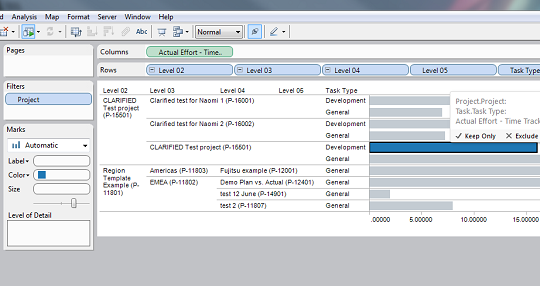
As we get more and more questions about if it is possible to use CLARIFIED for Clarizen data in Tableau, I will show you some examples below.


With Tableau it is very easy to create dashboards and analytics on CLARIFIED for Clarizen data. A connection to the CLARIFIED Cube can be made in minutes with the Microsoft Analysis Services connection in Tableau. In addition, Tableau has also a server version in which you can share your worksheets with other users. Read more about Tableau here: www.tableausoftware.com or view the Tableau product demo here : https://www.youtube.com/watch?v=37Mx3uZRwBE

Below are some examples that we have created with Tableau and the Clarizen Demo environment:
- Profitability By Account
- Profitability by Project Type
- Profitabilty by Project Manager
- Active Projects per Project Manager
- Resource Utilization


Profitability by Account


Click here to view the original screenshot.


Profitability by Project Type


Click here to view the original screenshot.


Profitability by Project Manager


Click here to view the original screenshot.


Active Projects per Project Manager

Click here to view the original screenshot.


Resource Utilization

Click here to view the original screenshot.


Resource Utilization

Click here to view the original screenshot.


30-Day free Trial
You can use CLARIFIED for Clarizen free for 30 days to make sure you like it. We don't ask you for a credit card when you sign up, so if you don't like it, there's nothing to cancel. And because CLARIFIED is Cloud Based, there is nothing to install! Click here to try it free for 30 days.

More information
Visit our website at www.clarified.biz for more information about CLARIFIED for Clarizen.


Thursday, February 21, 2013

CLARIFIED for Clarizen Pricing Plan Update

We have updated our CLARIFIED for Clarizen pricing plan for large volume users of Clarizen (75+) and wanted to share this information with you.

The new CLARIFIED for Clarizen plan will include the following:
• A fixed yearly license fee of USD 6,500, for an unlimited user count.
• Optional one-time setup fee of USD 2,300 for custom fields.
• Optional but recommended: prepaid 10 hours of consultancy for USD 1,200.


Why we changed the pricing plan

CLARIFIED for Clarizen has grown and we have learned a lot over the last year, and our users, partners and others have provided valuable feedback to us along the way. We understood that the license fee was getting too high for large volume users of Clarizen (75+) and for that reason we changed it.


30-Day free Trial
You can use Clarified for Clarizen free for 30 days to make sure you like it. We don't ask you for a credit card when you sign up, so if you don't like it, there's nothing to cancel. And because Clarified is Cloud Based, there is nothing to install! Click here to try it free for 30 days.

Clarizen Apps Store
You can also find us in the Clarizen Apps store here.


Thursday, February 14, 2013

CLARIFIED for Clarizen - Tableau

Probably you already knew that CLARIFIED for Clarizen is the reporting and analysis service for Clarizen users, offers rich dashboards and enables you to analyze your Clarizen data across all projects, using various criteria. All this within just a few mouse clicks.

But did you know it can be used as a source for bringing your reports and dashboards through Tableau?

Tableau
Tableau is a Business Intelligence software that provides browser-based analytics and reporting anyone can learn and use. It’s a rapid-fire alternative to the slow pace and rigidity of traditional Business Intelligence software. Click here for more information about Tableau.

Experience
After downloading Tableau, it just took me 5 minutes to install and connect Tableau to the CLARIFIED for Clarizen cube. Connecting to the cube was very easy with an Analysis Services Connection in Tableau. Within a view clicks I had instant reporting and visualization!


Besides using Tableau other third party Business Intelligence or reporting solutions like DundasTargitQlikView or RoamBI can be used to create your own dashboards.

Interested in CLARIFIED for Clarizen? Please contact us via info@bi-architects.nl or visit our www.clarified.biz portal for more information and to start your trial of today!


Tuesday, December 11, 2012

CLARIFIED for Clarizen is going mobile!


Probably you already knew that CLARIFIED for Clarizen is the reporting and analysis service for Clarizen users, offers rich dashboards and enables you to analyze your Clarizen data across all projects, using various criteria. All this within just a few mouse clicks.

But did you know it can be used as a source for bringing your reports and dashboards to your mobile phone or tablet?

We have setup dashboards in RoamBI, a mobile business intelligence solution that transforms data from major BI Systems into dashboard-style mobile analytics for iPhone or iPad, for one of our customers using our CLARIFIED for Clarizen service.


Besides using RoamBI other third party (mobile) BI or reporting solutions can be used to create your own dashboards and make it accessible on any device. Similar to monitoring the financial markets on TV, you now can focus on the Clarizen metrics that matters most to you.

Interested? Please contact me via H.O.Israel@BI-Architects.nl or visit our clarified.biz portal for more information and to start your trial today!

Tuesday, April 10, 2012

BI Architects visited the Microsoft SQL Server 2012 symposium

Yesterday a delegation of BI Architects visited the Microsoft SQL Server 2012 symposium at the Media Plaza in Utrecht.

During the symposium Microsoft presented the new version of their informationplatform SQL Server 2012. Richard Chin, general manager SQL Server strategy at Microsoft, kicked off the symposium with a keynote. After the keynote the symposium was divided into three blocks: Breakthrough insight with SQL Server 2012, Delivering Mission Critical Confidence to the Modern Enterprise and Building the Modern Enterprise with Hybrid IT.

A view at the stunning Media Plaza during the Microsoft SQL Server 2012 symposium.

As BI Architects we were mostly interested in the block concerning business intelligence, Breakthrough insight with SQL Server 2012. This block included a keynote from Marcel Westra, technology specialist BI at Microsoft NL, explaining the vision behind SQL Server 2012 and demonstrating the new features like PowerView and the integration of Hadoop (Big Data).

All of the speakers outlined five points off improvement for SQL Server 2012:

  • Greater availability. Deliver the required 9s and data protection with AlwaysOn, delivering added functionality over CTP3 that allows customers to experience multiple, readable secondaries for distributed scale of reporting and backup workloads and support for FileTable and FILESTREAM which brings first-class HA to complex data types.
  • Blazing-fast performance. More effectively govern performance in multi-tenancy environments like private cloud. Resource Governor enhancements include support for 64 resource pools, greater CPU usage control, and resource pool affinity for partitioning of physical resources and predictable resource allocation.
  • Rapid data exploration. Empower end users with new insights through rapid data exploration and visualization. Discover new insights at the speed of thought with more feature/functionality in Power View, the highly interactive, familiar browser-based data exploration, visualization, and presentation experience for end users.
  • Credible, consistent data. In addition to CTP3 functionality delivered for Data Quality Services and Master Data Services, customers can better support heterogeneous data within Data Warehouses through new Change Data Capture (CDC) support for Oracle.
  • Optimized productivity. Optimize IT and developer productivity across server and cloud with the new SQL Server Data Tools, a unified development experience for database and business intelligence projects, and cloud-ready capabilities within SQL Server Management Studio for snapshot backups to the Windows Azure Platform. Additionally, SQL Server 2012 offers a new version of Express – LocalDB. SQL Express LocalDB is a lightweight version of Express with all its programmability features, yet runs in user mode with a fast, zero-configuration installation and short list of pre-requisites. For more information and to try it out, go here.

There are three main editions planned for SQL Server 2012: Standard, Business Intelligence (new) and Enterprise. Business Intelligence adds better reporting via PowerView, PowerPivot for SharePoint Server, Data Quality Services, Master Data Services, and an In-Memory Tabular BI Semantic Model.

For more information about the new features go here.

All of the keynotes will be posted online by Microsoft,  keep watching this blog to find out were you can watch them!

Update:
The videos aren't online yet, but Microsoft sended the presentation to us in the PDF file format. Download the 15 MB zip file from this link.

Tuesday, April 3, 2012

Query to find the size of the database and database file


Technique 1:


     EXEC sp_helpdb


Technique 2: For a specific database:
sp_helpdb'adventureworks'


And you get the following output: (this one gives you the database and data file information for a specific database)


Technique 3: be in the context of the database and run sp_spaceused
Gives you the database size and certain more properties of it:


     EXEC sp_spaceused
This is what you get:


Technique 4: use sys.master_files


SELECTDB_NAME(database_id)AS DatabaseName,
Name AS LogicalName,
size*8/1024 Size_in_MB,
max_size
FROM sys.master_files
WHEREDB_NAME(database_id)='AdventureWorks'
GO


If you liked this post, do like us on FaceBook at http://www.facebook.com/pages/BI-Architects/249973345047634?sk=wall

Wednesday, February 29, 2012

Reporting Services 2008r2 (SSRS): New Webservice Endpoint


The report server includes a new management endpoint named ReportingService2010. This endpoint merges the functionalities of both the ReportingService2005 and ReportingService2006 endpoints, and can support management operations of the report server in both native mode and SharePoint integrated mode. It also includes new features that are introduced in SQL Server 2008 R2, such as shared datasets and cache refresh.

If the report server is configured for native mode or SharePoint integrate mode, the WSDL for the management endpoint can be accessed using one of the following URL:

http://<Server Name>/ReportServer/ReportService2010.asmx?wsdl

The ReportService2005 and ReportService2006 endpoints are deprecated in SQL Server 2008 R2. The ReportService2010 endpoint includes the functionalities of both endpoints and contains additional management features.


For more information, see Report Server Web Service Endpoints.

Tuesday, February 28, 2012

BI solution delivers insight on CXL P&L attributes

BI Architects develops Business Intelligence (BI) solutions for its customers ranging from commodity trading and enterprise risk to project management.

In this video blog I want to present a BI solution we have developed for one of our customers, that uses Triple Point’s Commodity XL (CXL), giving essential insight in the in the causes of the position and mark to market movements, including physical operations (P&L attributes).

The presentation depicted below describes our customer's needs, CXL and the solution itself.


For more information on our CXL BI solution for gaining insight on P&L attributes, please contact our sales manager Erik Rongen-Kleintjens via E.Rongen-Kleintjens@bi-architects.nl .

For more information on Triple Point’s Commodity XL (CXL) software, go to tpt.com .

Friday, February 24, 2012

Microsoft Visual Studio 11 Beta to Land on February 29th


Along with the release of Windows 8 Consumer Preview, Microsoft will also be unveiling Visual Studio 11's beta version next Wednesday.
Visual Studio 11 along with Team Foundation Server 11 has "hundreds" of latest features and Microsoft is addressing a very small selection before the release of the beta version. Visual Studio 11 will offer holistic solutions and also performance enhancements for various regularly performed tasks.

Unlike Visual Studio 2010, which is full of attractive colours, the new Visual Studio 11 is more "grey" to look at. For improving the scope to focus on text without any distraction the company decided to get rid of bright colours on the Integrated Development Environment (IDE), reported ARS Technica.
The new version is simpler as well as flatter as it does not have subdivisions, gradients and any other unnecessary details. This Metro designed version looks a lot like Visual Studio 2003, Office XP and Expression Blend. However, there is another version having darker theme but same simple and flat design.
Microsoft confirmed that Visual Studio 11 beta and .NET 4.5 beta will launch on 29th February.


Default toolbars in VS 2010
The default toolbars in VS 2010
Default toolbars in VS 11
The default toolbars in VS 11

For more information about the GUI go to MSDN.

Tuesday, February 14, 2012

No left navigation when new webpartpages are created in SharePoint 2010

Creating webpart pages or basic pages in SharePoint is done with a click of a button. But when you view the page you've created you won't get to see the left navigation menu. The cause I reckon is that the left side navigation is defined in the Master Page in the "PlaceHolderLeftNavBar" content place holder and templates for webpart pages shipped with SharePoint are overriding this content place holder and delete its content. 


The solution for this is to change the page so it will not override the menu place holder, but inherite it from the Master Page. The place holders we are interested in are: "PlaceHolderLeftNavBar" and "PlaceHolderNavSpacer". 


Start by opening the SharePoint Designer. Open the webpart page or basic page you want to add the menu to. In code view look for the following lines and delete them:

      <asp:Content ContentPlaceHolderId="PlaceHolderLeftNavBar" runat="server"></asp:Content>
and
      <asp:Content ContentPlaceHolderId="PlaceHolderNavSpacer" runat="server"></asp:Content> 
and
      <SharePoint:UIVersionedContent ID="WebPartPageHideQLStyles" UIVersion="4" runat="server">
      <ContentTemplate>
      <style type="text/css">
      body #s4-leftpanel {
      display:none;
      }
      .s4-ca {
      margin-left:0px;
      }
      </style>


Save the file. You will get a warning saying you are about to customize the page. Just go ahead.


Hope this saves time.

Thursday, January 26, 2012

BI Architects uses TurtoiseSVN for version and source control

BI Architects (BIA) is the Business Intelligence specialist in Commodity Trading and uses the following tools:
  • Microsoft: development and database tools for developing solutions
  • Clarizen Online Project Management software: project management
  • Turtoise Subversion: revision control, version control and source control software
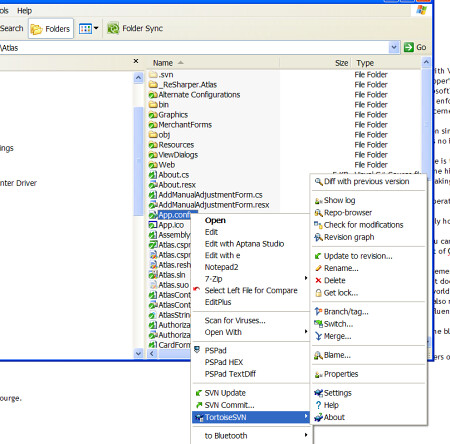
In this blog I would like to write about source/version control and the way we handle source/version control within our company. As mentioned we use TurtoiseSVN. TortoiseSVN is an easy-to-use SCM / source control software for Microsoft Windows and Apache. It is implemented as a Windows shell extension, which makes it integrate seamlessly into the Windows explorer.

It is developed under the GPL. Which means it is completely free, including the source code. But just in case you don't know the GPL too well: you can use TortoiseSVN to develop commercial applications or just use it in your company without any restrictions.

TortoiseSVN is a Subversion client and therefore has all the features of Subversion itself, including:
  • Most current CVS features.
  • Directories, renames, and file meta-data are versioned.
  • Commits are truly atomic.
  • Branching and tagging are cheap (constant time) operations.
  • Efficient handling of binary files.


BI-Architects mainly uses the following TurtoiseSVN functionality:
  • New solutions are created as folders in the TurtoiseSVN database.
  • Via the update functionality we update our local instance with the newest (committed) database version of the solution.
  • Via the commit functionality we store the updated or improved version (including the end of day situation) in the subversion database.
  • Release versions are controled by using tag functionality
With using TurtoiseSVN BIA has control on software development. More information on TurtoiseSVN can be found here.

SharePoint 2010 Advanced Developer Training

For developers, SharePoint 2010 provides a business collaboration platform to rapidly build solutions and respond to business needs. SharePoint 2010 Advanced Developer Training offers technical training as self-paced modules and hosted labs for SharePoint 2007 professionals who want to upgrade their skills to SharePoint 2010.

Module 8 for example, presents Business Intelligence capabilities in SharePoint 2010. There are improvements in this area to help build Business Intelligence dashboards, which can be used to expose relevant information for business users in a meaningful way.

SharePoint 2010 Advanced Training
01 : Developer Roadmap and Tools
02 : Core Development
03 : User Interfaces and Lists
04 : Data Access in Technologies
05 : Composite Solutions
06 : Enterprise Content Management
07 : Enterprise Search
08 : Business Intelligence
09 : Communities
10 : Development Life Cycle

Thursday, January 5, 2012

Clarizen posts BI Architects video to Social Media

We were very happy to see the posts of Clarizen, leading global provider of collaborative online project management software, in the Social Media referring to the video we made of our Clarizen BI Solution.

Thank you, Hilee Avrahami of Clarizen, for bringing this video to your customers and followers attention!

Here you can have another look at our video:


Our Business Intelligence solution for Clarizen adds reporting functionality that helps the project managers monitor, track and report project progress (including KPI's and earned values), the finance department enable swift and correct detailed invoicing and the management team gaining direct insight in the performance/profitability of projects.

For more information about the extension for Clarizen please contact our sales manager Erik Rongen-Kleintjens (E.Rongen-Kleintjens@bi-architects.nl).

Hermann-Otto Israël
BI Architects project manager

Thursday, December 8, 2011

SSIS datatypes VS SQL Server datatypes

Often it can be extremely confusing when you encounter SSIS data types.  At first glance they seem to be nothing like SQL Server data types.  That's why I wanted to write this blogpost,  below a conversion chart of SSIS data types to SQL Server data types.  This information is readily available on MSDN but it always seems difficult to find.  

SSIS Data Type
SSIS Expression
SQL Server
single-byte signed integer
(DT_I1)

two-byte signed integer
(DT_I2)
smallint
four-byte signed integer
(DT_I4)
int
eight-byte signed integer
(DT_I8)
bigint
single-byte unsigned integer
(DT_UI1)
tinyint
two-byte unsigned integer
(DT_UI2)

four-byte unsigned integer
(DT_UI4)

eight-byte unsigned integer
(DT_UI8)

float
(DT_R4)
real
double-precision float
(DT_R8)
float
string
(DT_STR, «length», «code_page»)
char, varchar
Unicode text stream
(DT_WSTR, «length»)
nchar, nvarchar, sql_variant, xml
date
(DT_DATE)
date
Boolean
(DT_BOOL)
bit
numeric
(DT_NUMERIC, «precision», «scale»)
decimal, numeric
decimal
(DT_DECIMAL, «scale»)
decimal
currency
(DT_CY)
smallmoney, money
unique identifier
(DT_GUID)
uniqueidentifier
byte stream
(DT_BYTES, «length»)
binary, varbinary, timestamp
database date
(DT_DBDATE)
date
database time
(DT_DBTIME)

database time with precision
(DT_DBTIME2, «scale»)
time(p)
database timestamp
(DT_DBTIMESTAMP)
datetime, smalldatetime
database timestamp with precision
(DT_DBTIMESTAMP2, «scale»)
datetime2
database timestamp with timezone
(DT_DBTIMESTAMPOFFSET, «scale»)
datetimeoffset(p)
file timestamp
(DT_FILETIME)

image
(DT_IMAGE)
image
text stream
(DT_TEXT, «code_page»)
text
Unicode string
(DT_NTEXT)
ntext


Hope this helps!