FOLLOW US

Thursday, October 3, 2013

One click access to CLARIFIED for Clarizen reports from Clarizen


Currently we're working on new functionality which makes it possible to open CLARIFIED for Clarizen reports from within Clarizen or Salesforce.

From the custom actions menu in Clarizen it will be possible to open a popup window with the report of your needs based on CLARIFIED for Clarizen's dataset which holds your project data. Out-of-the box it will be possible to open project status, billing or resource utilization reports. Over time we will extend this set with new reports or custom built reports only accessible for your organization.

Open reports from within Clarizen or Salesforce 

See Project details within seconds

Interested in this and much more CLARIFIED for Clarizen has to offer?
  • v6 compatible
  • Clarizen Partner: supports every Clarizen edition (profesional, enterprise, unlimited)
  • CLARIFIED for Clarizen can connect to numerous BI tools like Tableau, DundasCubeware and TARGIT.
  • Within a few clicks access to all your Clarizen Project data.
  • Out-of-the-box slice and dice functionality.
  • No more time needed to develop Excel queries or lookup’s.
  • Out-of-the-box reporting for billing purposes is easy. Fields include Billing Type, Fixed Price and Period selection. So reporting all Revenue that should be billed in a given period is easy and saves a lot of time and errors for the accounting department.
  • Resource Utilization can be represented graphically, both on individual and on Group level. Resource Utilization can be shown on Planned and Actual effort.

Watch the product video here or sign up now for the 30-day trail. Click here to try it free for 30 days!

Friday, June 21, 2013

MOVIE: Use QlikView to analyze your Clarizen project data


With CLARIFIED for Clarizen it's possible to analyse, create dashboards or reports with Qlikview on your Clarizen project data. In the video below you can see how it's done.

Main features and benefits of QlikView:
  • use of an in-memory data model
  • automated data integration and a graphical analytical environment attractive for customers
  • fast and powerful visualization capabilities
  • flexible - allows unlimited dimensions and measures and can be modified in seconds
  • integrated - all in one solution : dashboards, power analysis and simply reporting on a single architecture
  • risk free - available as a fully-functional free trial download


Next to Qlikview it's possible to use numerous other BI tools which can connect to a Microsoft Analysis Services cube.

Interested?
You can use CLARIFIED for Clarizen free for 30 days to make sure you like it. We don't ask you for a credit card when you sign up, so if you don't like it, there's nothing to cancel. And because CLARIFIED is Cloud Based, there is nothing to install! Click here to try it free for 30 days.

Friday, June 14, 2013

MOVIE: Connect to CLARIFIED for Clarizen within seconds using Tableau


As a follow up on the previous post we want to show you how easy it is to connect Tableau 8.0 to CLARIFIED for Clarizen.

Within a minute you're connected and can start using Tableau's powerful visualization and analytical capabilities. No need to develop expensive and timeconsuming Excel file sources. All your Clarizen project data already resides in your CLARIFIED for Clarizen environment ready for you to use.


Next to Tableau you can use numerous other BI tools which can connect to CLARIFIED for Clarizen.

Interested?
You can use CLARIFIED for Clarizen free for 30 days to make sure you like it. We don't ask you for a credit card when you sign up, so if you don't like it, there's nothing to cancel. And because CLARIFIED is Cloud Based, there is nothing to install! Click here to try it free for 30 days.

You can also use Tableau 14 days for free, download your trial here.

Next week:
Keep an eye on this blog next week when we will show you how easy it is to create your own dashboards based on your Clarizen project data with Tableau and CLARIFIED for Clarizen.

Tuesday, June 4, 2013

Clarizen project data in Tableau


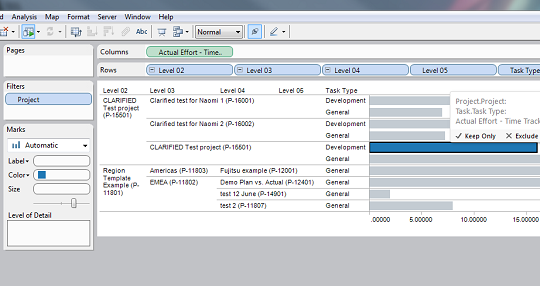
As we get more and more questions about if it is possible to use CLARIFIED for Clarizen data in Tableau, I will show you some examples below.


With Tableau it is very easy to create dashboards and analytics on CLARIFIED for Clarizen data. A connection to the CLARIFIED Cube can be made in minutes with the Microsoft Analysis Services connection in Tableau. In addition, Tableau has also a server version in which you can share your worksheets with other users. Read more about Tableau here: www.tableausoftware.com or view the Tableau product demo here : https://www.youtube.com/watch?v=37Mx3uZRwBE

Below are some examples that we have created with Tableau and the Clarizen Demo environment:
- Profitability By Account
- Profitability by Project Type
- Profitabilty by Project Manager
- Active Projects per Project Manager
- Resource Utilization


Profitability by Account


Click here to view the original screenshot.


Profitability by Project Type


Click here to view the original screenshot.


Profitability by Project Manager


Click here to view the original screenshot.


Active Projects per Project Manager

Click here to view the original screenshot.


Resource Utilization

Click here to view the original screenshot.


Resource Utilization

Click here to view the original screenshot.


30-Day free Trial
You can use CLARIFIED for Clarizen free for 30 days to make sure you like it. We don't ask you for a credit card when you sign up, so if you don't like it, there's nothing to cancel. And because CLARIFIED is Cloud Based, there is nothing to install! Click here to try it free for 30 days.

More information
Visit our website at www.clarified.biz for more information about CLARIFIED for Clarizen.


Tuesday, May 21, 2013

CLARIFIED for Clarizen: report section added to the portal.


Together with the release of CLARIFIED for Clarizen v1.3.3 we've also added a new section to the CLARIFIED for Clarizen portal: the report section.

In this new section it's possible to download template reports which can serve as a starting point for your custom reports. We're starting off with Microsoft Excel templates and will expand the section with templates for other BI tools like Tableau in the coming months.


Microsoft Excel templates in the following categories are now available for you to download: summaries, project, financials and resources. In the weeks to come we will extend the Microsoft Excel templates portfolio with new templates and new categories.


Templates that are available right now are:
      • Customer summary
      • Projects overview on state
      • Projects earned value chart
      • Billing
      • Resource Utilization
Watch this video to see where you can find the report section and how to download and refresh the Microsoft Excel template you downloaded!

Sign-up now!
You can use Clarified for Clarizen free for 30 days to make sure you like it. We don't ask you for a credit card when you sign up, so if you don't like it, there's nothing to cancel. And because Clarified is Cloud Based, there is nothing to install! Click here to try it free for 30 days.

More information
Visit our website at www.clarified.biz for more information about CLARIFIED for Clarizen.

Friday, May 17, 2013

CLARIFIED for Clarizen version 1.3.3 released


We are proud to announce that we've released CLARIFIED for Clarizen version 1.3.3 with improved backend processing and increased overall performance! Watch the product video here.

Reporting for billing purposes is now even easier with the added fields:
  • Billing Type (Actual Cost, Fixed Price, Not Billable)
  • Has Fixed Price, Has Fixed Cost
  • Cost Type (Actual Cost, Fixed Cost)


We've also added new count measures:
  •  New count measures (Work Item Count, Project Count)


Added value
CLARIFIED for Clarizen’s added value consists of:
  • Within a few clicks access to all your Clarizen Project data.
  • Out-of-the-box slice and dice functionality.
  • No more time needed to develop Excel queries or lookup’s.
  • Out-of-the-box dash boarding on an Executive level is. One can even set Revenue or Profit Goals on any given context (like a given Portfolio and Year period) and compare the Actuals against it graphically.
  • Out-of-the-box reporting for billing purposes is easy. Fields include Billing Type, Fixed Price and Period selection. So reporting all Revenue that should be billed in a given period is easy and saves a lot of time and errors for the accounting department.
  • Resource Utilization can be represented graphically, both on individual and on Group level. Resource Utilization can be shown on Planned and Actual effort.
  • Tracing inconsistent data entry in Clarizen is made easy. Like reporting all Time sheet effort that is not approved yet.
  • CLARIFIED for Clarizen can connect to numerous BI tools like Tableau, Dundas, Cubeware and TARGIT.

30-Day free Trial
You can use Clarified for Clarizen free for 30 days to make sure you like it. We don't ask you for a credit card when you sign up, so if you don't like it, there's nothing to cancel. And because Clarified is Cloud Based, there is nothing to install! Click here to try it free for 30 days.

More information
Visit our website at www.clarified.biz for more information about CLARIFIED for Clarizen.

Thursday, March 21, 2013

OLAP PivotTable Extension

Recently I was working on a PivotTable Report with data from a SSAS Cube (Excel version 2010).
I needed a Profitability Trend calculation for a client, but this calculation was not available in the Cube. Because in Excel 2010 the functionality to create calculated measures is not exposed in the User Interface, I searched on the internet and found OLAP PivotTable Extension, a free add-in for Excel.


Click here to check out the features of OLAP PivotTable Extension.

Thursday, February 21, 2013

CLARIFIED for Clarizen Pricing Plan Update

We have updated our CLARIFIED for Clarizen pricing plan for large volume users of Clarizen (75+) and wanted to share this information with you.

The new CLARIFIED for Clarizen plan will include the following:
• A fixed yearly license fee of USD 6,500, for an unlimited user count.
• Optional one-time setup fee of USD 2,300 for custom fields.
• Optional but recommended: prepaid 10 hours of consultancy for USD 1,200.


Why we changed the pricing plan

CLARIFIED for Clarizen has grown and we have learned a lot over the last year, and our users, partners and others have provided valuable feedback to us along the way. We understood that the license fee was getting too high for large volume users of Clarizen (75+) and for that reason we changed it.


30-Day free Trial
You can use Clarified for Clarizen free for 30 days to make sure you like it. We don't ask you for a credit card when you sign up, so if you don't like it, there's nothing to cancel. And because Clarified is Cloud Based, there is nothing to install! Click here to try it free for 30 days.

Clarizen Apps Store
You can also find us in the Clarizen Apps store here.


Thursday, February 14, 2013

CLARIFIED for Clarizen - Tableau

Probably you already knew that CLARIFIED for Clarizen is the reporting and analysis service for Clarizen users, offers rich dashboards and enables you to analyze your Clarizen data across all projects, using various criteria. All this within just a few mouse clicks.

But did you know it can be used as a source for bringing your reports and dashboards through Tableau?

Tableau
Tableau is a Business Intelligence software that provides browser-based analytics and reporting anyone can learn and use. It’s a rapid-fire alternative to the slow pace and rigidity of traditional Business Intelligence software. Click here for more information about Tableau.

Experience
After downloading Tableau, it just took me 5 minutes to install and connect Tableau to the CLARIFIED for Clarizen cube. Connecting to the cube was very easy with an Analysis Services Connection in Tableau. Within a view clicks I had instant reporting and visualization!


Besides using Tableau other third party Business Intelligence or reporting solutions like DundasTargitQlikView or RoamBI can be used to create your own dashboards.

Interested in CLARIFIED for Clarizen? Please contact us via info@bi-architects.nl or visit our www.clarified.biz portal for more information and to start your trial of today!


Friday, January 18, 2013

List All SSIS Packages Deployed On Your Integration Server


One way of checking wich SSIS packages you've deployed on your integration server and wich version build numbers they have is by running a TSQL query against the MSDB database on the server where your integration services  is running.

I found the following blogpost with a very usefull TSQL script:

http://blog.hoegaerden.be/2010/01/10/list-all-ssis-packages-deployed-on-your-integration-server/

NOTE: the query was written for SQL Server 2008. For SQL Server 2005: sysssispackagefolders => sysdtspackagefolders90 and sysssispackages => sysdtspackages90.

Tuesday, December 11, 2012

CLARIFIED for Clarizen is going mobile!


Probably you already knew that CLARIFIED for Clarizen is the reporting and analysis service for Clarizen users, offers rich dashboards and enables you to analyze your Clarizen data across all projects, using various criteria. All this within just a few mouse clicks.

But did you know it can be used as a source for bringing your reports and dashboards to your mobile phone or tablet?

We have setup dashboards in RoamBI, a mobile business intelligence solution that transforms data from major BI Systems into dashboard-style mobile analytics for iPhone or iPad, for one of our customers using our CLARIFIED for Clarizen service.


Besides using RoamBI other third party (mobile) BI or reporting solutions can be used to create your own dashboards and make it accessible on any device. Similar to monitoring the financial markets on TV, you now can focus on the Clarizen metrics that matters most to you.

Interested? Please contact me via H.O.Israel@BI-Architects.nl or visit our clarified.biz portal for more information and to start your trial today!

Thursday, November 15, 2012

New CLARIFIED for Clarizen product video

Today we have released a new CLARIFIED for Clarizen product video.


Visit our website at www.clarified.biz for more information about CLARIFIED for Clarizen.

Saturday, November 3, 2012

Delete duplicates from SQL without having a primary key

Recently I had a problem with finding duplicate records in a SQL table without having a primary key. Because I didn't want to create a primary key in the table, I had to use a different method in my SQL statement.

In the SQL example below you will see how to find the duplicate records. I used the SQL
ROW_NUMBER() function for it to differentiate between duplicate records.

DELETE SubQuery FROM
(SELECT ROW_NUMBER() OVER (PARTITION BY ID ORDER BY ID) NumOccurrences
FROM [dbo].[ClarizenDeletions]) SubQuery
WHERE SubQuery.NumOccurrences > 1

Tuesday, October 30, 2012

CLARIFIED for Clarizen version 1.3 released

With great enthusiasm we introduce version 1.3 of the Analysis and Reporting extension Clarified for Clarizen to you. Working closely with Clarizen, BI Architects we developed this extension for Clarizen customers who require extensive analysis of their Clarizen project data and/or in need of extensive reporting features including dashboards and KPI's.

CLARIFIED for Clarizen enables you to analyze your Clarizen data across all projects, using various criteria from a management point of view (highlights, KPI’s) or with detailed views for specific projects (Trends, Earned value, CPI, SPI, Resource Utilization etc.). All this within just a few mouse clicks. You can think of criteria like: Customers, Employees, Time periods, Project types and Task types.

In the 1.3 version of CLARIFIED for Clarizen we have improved and speed up the process of importing and refreshing  Clarizen data in the backend. In the frontend we have simplified our information model by gathering the date dimensions and adding the measure group Resource Capacity.

If you are interested in using CLARIFIED for Clarizen please visit and register at clarified.biz. After registration you can use the full functionality of Clarified for Clarizen free for 30 days to make sure you like it. We don't ask your for a credit card when you sign up, so if you don't like it, there's nothing to cancel. And because Clarified is Cloud Based, there is nothing to install!

On the Clarified.biz website, entrance to the Clarified portal, you will find information about the product, dashboard samples and videos on how to use CLARIFIED for Clarizen. When logged in, you will have access to the standard dashboards, Clarified Excel file, the online manuals and frequently asked questions.
For more information on Clarified for Clarizen, please visit the Clarified.biz website or contact us via info@bi-architects.nl.

Hermann-Otto Israël
Customer Success Manager
BIA Architects

Saturday, August 25, 2012

Working with graphs in Clarified is easy!

Create a project performance chart within a few clicks.

The following demo shows you the ease of use of the Clarified Excel file. In this demo we use the Clarified Excel and MS Excel pivot table functionality.


Click here to go to the Clarified for Clarizen website.

Monday, June 25, 2012

Clarified for Clarizen published in Apps Marketplace

With great enthusiasm we introduce the Analysis and Reporting extension CLARIFIED for Clarizen to you. Working closely with Clarizen, BI Architects developed this extension. We developed it for Clarizen customers who require extensive analysis of their Clarizen project data and/or in need of extensive reporting features including dashboards and KPI's. The extension is published today in the Clarizen Apps Marketplace here.

Click here to sign up for a FREE 30-Day Trial.


The Clarizen Extension


The extension enables you to analyze your Clarizen data across all projects, using various criteria from a management point of view (highlights, KPI’s) or with detailed views for specific projects (Trends, EVA, CPI, SPI, Milestones etc.). All this within just a few mouse clicks. You can think of criteria like: Customers, Employees, Time periods, Project types and Task types.

To mention some examples what this analysis might bring you:
• Analysis on task types helps you to make reliable estimates for new projects
• Analysis by employee allows you to compare the performance with colleagues
• Analysis of project types will help you better determine what types of projects are successful and
  which are less successful
• Analysis on customers gives you insight into the profitability of customers.


Click here to download our Clarified for Clarizen brochure.


Tuesday, April 24, 2012

Microsoft downgrades storage capacity from 25 GB to 7 GB


Microsoft has released SkyDrive applications for Windows and Mac , that integrates the cloud service into the operating system. In addition, the storage capacity for new users is decreased from 25 GB to 7GB.

Microsoft has also adapted the available storage capacity. Previously, SkyDrive users had access up to 25GB of space to store their files. Now this is reduced to 7GB for new users.

For current users who have files on their SkyDrive, 25GB may be retained, however they must separately indicate that they want to keep their 25 GB of storage. According to Microsoft uses roughly 99 percent of users less than 7GB and therefore few people will get into trouble by the reduction.


If you want to keep the 25 GB of storage instead of 7 GB go here!

Tuesday, April 10, 2012

BI Architects visited the Microsoft SQL Server 2012 symposium

Yesterday a delegation of BI Architects visited the Microsoft SQL Server 2012 symposium at the Media Plaza in Utrecht.

During the symposium Microsoft presented the new version of their informationplatform SQL Server 2012. Richard Chin, general manager SQL Server strategy at Microsoft, kicked off the symposium with a keynote. After the keynote the symposium was divided into three blocks: Breakthrough insight with SQL Server 2012, Delivering Mission Critical Confidence to the Modern Enterprise and Building the Modern Enterprise with Hybrid IT.

A view at the stunning Media Plaza during the Microsoft SQL Server 2012 symposium.

As BI Architects we were mostly interested in the block concerning business intelligence, Breakthrough insight with SQL Server 2012. This block included a keynote from Marcel Westra, technology specialist BI at Microsoft NL, explaining the vision behind SQL Server 2012 and demonstrating the new features like PowerView and the integration of Hadoop (Big Data).

All of the speakers outlined five points off improvement for SQL Server 2012:

  • Greater availability. Deliver the required 9s and data protection with AlwaysOn, delivering added functionality over CTP3 that allows customers to experience multiple, readable secondaries for distributed scale of reporting and backup workloads and support for FileTable and FILESTREAM which brings first-class HA to complex data types.
  • Blazing-fast performance. More effectively govern performance in multi-tenancy environments like private cloud. Resource Governor enhancements include support for 64 resource pools, greater CPU usage control, and resource pool affinity for partitioning of physical resources and predictable resource allocation.
  • Rapid data exploration. Empower end users with new insights through rapid data exploration and visualization. Discover new insights at the speed of thought with more feature/functionality in Power View, the highly interactive, familiar browser-based data exploration, visualization, and presentation experience for end users.
  • Credible, consistent data. In addition to CTP3 functionality delivered for Data Quality Services and Master Data Services, customers can better support heterogeneous data within Data Warehouses through new Change Data Capture (CDC) support for Oracle.
  • Optimized productivity. Optimize IT and developer productivity across server and cloud with the new SQL Server Data Tools, a unified development experience for database and business intelligence projects, and cloud-ready capabilities within SQL Server Management Studio for snapshot backups to the Windows Azure Platform. Additionally, SQL Server 2012 offers a new version of Express – LocalDB. SQL Express LocalDB is a lightweight version of Express with all its programmability features, yet runs in user mode with a fast, zero-configuration installation and short list of pre-requisites. For more information and to try it out, go here.

There are three main editions planned for SQL Server 2012: Standard, Business Intelligence (new) and Enterprise. Business Intelligence adds better reporting via PowerView, PowerPivot for SharePoint Server, Data Quality Services, Master Data Services, and an In-Memory Tabular BI Semantic Model.

For more information about the new features go here.

All of the keynotes will be posted online by Microsoft,  keep watching this blog to find out were you can watch them!

Update:
The videos aren't online yet, but Microsoft sended the presentation to us in the PDF file format. Download the 15 MB zip file from this link.

Tuesday, April 3, 2012

Query to find the size of the database and database file


Technique 1:


     EXEC sp_helpdb


Technique 2: For a specific database:
sp_helpdb'adventureworks'


And you get the following output: (this one gives you the database and data file information for a specific database)


Technique 3: be in the context of the database and run sp_spaceused
Gives you the database size and certain more properties of it:


     EXEC sp_spaceused
This is what you get:


Technique 4: use sys.master_files


SELECTDB_NAME(database_id)AS DatabaseName,
Name AS LogicalName,
size*8/1024 Size_in_MB,
max_size
FROM sys.master_files
WHEREDB_NAME(database_id)='AdventureWorks'
GO


If you liked this post, do like us on FaceBook at http://www.facebook.com/pages/BI-Architects/249973345047634?sk=wall

Tuesday, March 20, 2012

Notepad++ a free and useful tool

Notepad++ is a free source code editor and Notepad replacement that supports several languages. Running in the MS Windows environment, its use is governed by GPL License.

Almost every day I use Notepad++ for text file editing and from time to time to look at source files like Javascript and CSS. It supports syntax highlighting for various languages, which I find very useful. Notepad++ supports various plugins and does also have a column editing mode. To enable column editing mode just hold the "Alt" key and select the text with your left mouse button.

Notepad++ can be found here.


Some useful features of Notepad++:
  • Syntax Highlighting and Syntax Folding
  • Find and replace over multiple documents
  • File comparison
  • Zoom in and zoom out
  • Multi-Language environment supported
  • Drag-and-drop